




Most small and mid-sized businesses use Microsoft 365 every day.
Employees rely on Outlook for email, Teams for meetings, Word and Excel for documents, and OneDrive or SharePoint for file storage. From the outside, it may look like Microsoft 365 is fully implemented and working as expected.
But in many businesses, Microsoft 365 is only being used at the surface level.
The platform includes powerful tools for security, collaboration, automation, file governance, access control, and business productivity. The problem is that many of these capabilities are never fully configured, introduced, or aligned to how the business actually operates.
That means many companies are already paying for value they are not receiving.
Microsoft 365 for Small Businesses: Quick Overview
Microsoft 365 is often thought of as email and Office apps, but it is much more than that.
For small and mid-sized businesses, Microsoft 365 can support:
- Email and calendar management
- File storage and sharing
- Team collaboration
- Video meetings and chat
- Identity and access security
- SharePoint, OneDrive, and Teams security scanning
- Data loss prevention
- Workflow automation
- Compliance and retention policies
- Device and application management
The value of Microsoft 365 depends on how well it is configured and adopted.
A business may have the right licensing in place but still miss major opportunities if the platform is only used for basic email, documents, and meetings.
Why Most Businesses Only Scratch the Surface
Microsoft 365 has grown significantly over time.
Many businesses started with email migration or Office licensing and then gradually added Teams, OneDrive, SharePoint, or security tools as needed. Because adoption often happens in pieces, the environment may never be reviewed as a complete platform.
That creates gaps.
A company may use Teams for meetings but not as a structured collaboration hub. It may store files in SharePoint but still lack clear governance. It may have SharePoint, OneDrive, and Teams security scanning available but not fully configured. It may have automation tools included but no process for identifying workflows that could be improved.
In other words, Microsoft 365 may be working — but not working as well as it could.
What Microsoft 365 Actually Includes
Microsoft 365 is designed to be a business productivity and security platform.
Depending on licensing, businesses may have access to tools that support communication, collaboration, security, compliance, automation, and device management. Many of these capabilities can replace disconnected third-party tools or improve processes that are currently manual.
Common Microsoft 365 capabilities include:
- Outlook and Exchange Online for email
- Teams for meetings, chat, phone, and collaboration
- SharePoint and OneDrive for file storage and sharing
- SharePoint, OneDrive, and Teams security scanning for collaboration content
- Entra ID for identity and access management
- Conditional Access for smarter login controls
- Intune for device and application management
- Purview for compliance, retention, and data protection
- Power Automate for workflow automation
- Planner and Lists for task and process tracking
Not every business needs every feature turned on at once.
But every business should understand what is included, what is being used, and what could deliver additional value.
Common Areas Businesses Underuse
Many businesses assume Microsoft 365 is fully utilized because employees are actively using Outlook, Teams, and Office apps.
But regular usage does not always mean full optimization.
Here are common areas where businesses often leave value on the table.
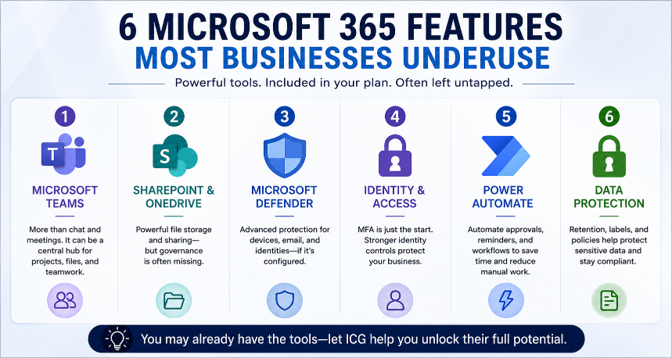
1. Microsoft Teams as More Than Chat
Teams is often used for meetings and quick messages, but it can be much more than a communication tool.
When structured properly, Teams can become a central workspace for departments, projects, documents, meetings, approvals, and collaboration. It can reduce the need to search across email chains, shared drives, and disconnected apps.
Without structure, however, Teams can quickly become cluttered and confusing.
The value comes from creating clear channels, file structures, naming standards, permissions, and adoption practices.
2. SharePoint and OneDrive Governance
SharePoint and OneDrive are powerful tools for cloud file storage and collaboration.
But if they are not governed properly, businesses can end up with duplicate folders, unclear permissions, uncontrolled external sharing, and inconsistent file ownership.
This creates both productivity and security issues.
A better approach includes reviewing file permissions, external sharing settings, retention requirements, ownership, and how Teams, SharePoint, and OneDrive work together.
3. SharePoint, OneDrive, and Teams Security Scanning
Many businesses store important documents, client data, and collaboration content across SharePoint, OneDrive, and Teams.
That content needs visibility and protection. Security scanning for these collaboration areas can help identify risky files, suspicious activity, and data exposure concerns that may otherwise go unnoticed.
This is different from endpoint security. The focus is on helping businesses better protect and monitor content inside Microsoft 365 collaboration tools.
Like any security capability, scanning needs to be configured, reviewed, and aligned with the way the business uses Microsoft 365.
4. Identity and Access Controls
User identity is now one of the most important parts of business security.
Microsoft 365 includes identity-related controls that can help protect accounts, reduce unauthorized access, and improve login security. This may include MFA, Conditional Access, admin role reviews, risky sign-in monitoring, and access policies.
Many businesses enable basic MFA and stop there.
That is a good start, but it is not the same as a mature identity security strategy.
5. Workflow Automation
Many manual business processes still live in email, spreadsheets, and repeated follow-ups.
Power Automate can help reduce repetitive work by automating approvals, notifications, reminders, form submissions, and data movement between systems.
Even small automations can save meaningful time.
For example, a business may automate employee onboarding steps, approval requests, document review notifications, or recurring task reminders. These are not dramatic changes, but they can reduce friction and improve consistency.
6. Compliance, Retention, and Data Protection
Many businesses store sensitive data in Microsoft 365 but do not have clear retention, labeling, or data protection policies.
This matters for industries that handle client records, financial information, healthcare information, legal documents, HR files, or regulated data.
Microsoft 365 includes tools that can help with retention, data loss prevention, sensitivity labeling, audit logging, and compliance workflows.
Without planning, these features often remain unused.
Why Default Settings Are Not Enough
Microsoft 365 can be easy to start using, but default settings are rarely enough for long-term security and efficiency.
Default configurations are designed to help organizations get started. They are not automatically tailored to your users, risk profile, compliance needs, file structure, or business workflows.
Over time, this can create issues such as:
- Too much external sharing
- Too many users with unnecessary access
- Weak admin role management
- Inconsistent Teams and SharePoint structure
- Unreviewed third-party app permissions
- Collaboration security scanning left partially configured
- Manual processes that could be automated
- Licensing that does not match actual usage
A Microsoft 365 environment should be reviewed periodically to ensure it still supports the business.
What worked during initial setup may not be enough after growth, staff changes, new compliance needs, or increased cybersecurity risk.
The Consolidation Opportunity
One of the biggest missed opportunities in Microsoft 365 is tool consolidation.
Many businesses pay for separate tools that overlap with capabilities already available inside Microsoft 365. These may include file-sharing platforms, basic task management tools, meeting solutions, collaboration security tools, workflow platforms, or document collaboration applications.
That does not mean every third-party tool should be eliminated.
But it does mean businesses should regularly ask whether they are paying twice for similar capabilities.
A Microsoft 365 optimization review can help identify:
- Redundant tools
- Underused licenses
- Unused collaboration security capabilities
- Manual workflows that can be automated
- File systems that can be simplified
- Collaboration tools that can be standardized
The goal is not simply to cut costs. The goal is to reduce complexity and make technology easier to manage.
How Better Microsoft 365 Use Improves Security and Productivity
Microsoft 365 optimization is not just an IT cleanup exercise.
When the platform is configured well, it can improve how the business operates.
- Security improves because access is better controlled, sensitive data is better protected, and collaboration content is easier to monitor.
- Productivity improves because employees can collaborate in more organized spaces, find information faster, and reduce manual tasks.
- Management improves because leadership has better visibility into users, licensing, sharing, workflows, and overall risk.
The result is a more secure and efficient business environment built around tools your company may already own.
Related Resources
For a broader look at how Microsoft 365 security fits into your overall protection strategy, read our Cybersecurity for Small Businesses: The Complete Guide: https://www.icgi.com/blogs/cybersecurity-for-small-businesses-the-complete-guide
To learn more about how ICG helps businesses modernize with Microsoft cloud technologies, visit our Microsoft Cloud Services page: https://www.icgi.com/solutions/microsoft-cloud-services
What Business Leaders Should Review
If your organization uses Microsoft 365, business leaders should periodically review how well the platform is being used.
Important questions include:
- Are we using Microsoft 365 beyond email and Office apps?
- Are Teams, SharePoint, and OneDrive structured properly?
- Do we have clear file-sharing and external access policies?
- Is SharePoint, OneDrive, and Teams security scanning configured where appropriate?
- Are multi-factor authentication (MFA) and Conditional Access properly implemented?
- Do we know which third-party apps have access to our environment?
- Are we using automation to reduce manual work?
- Are we paying for tools Microsoft 365 could already support?
- Are licenses aligned with actual business needs?
- Has the environment been reviewed in the last 12 months?
These questions help reveal where Microsoft 365 may be underused or misconfigured.
How ICG Helps Businesses Get More from Microsoft 365
ICG helps businesses move beyond basic Microsoft 365 usage and get more value from the platform.
Our approach starts with understanding how your organization is using Microsoft 365 today. We review licensing, security settings, user access, collaboration structure, file sharing, device management, and opportunities for workflow improvement.
From there, we help prioritize practical improvements that align with your business goals.
This may include:
- Strengthening identity security
- Improving SharePoint and Teams structure
- Reviewing SharePoint, OneDrive, and Teams security scanning
- Identifying underused Microsoft 365 features
- Reducing unnecessary tool overlap
- Streamlining workflows through automation
The goal is simple: help your business get more value from Microsoft 365 while improving security, productivity, and operational efficiency.
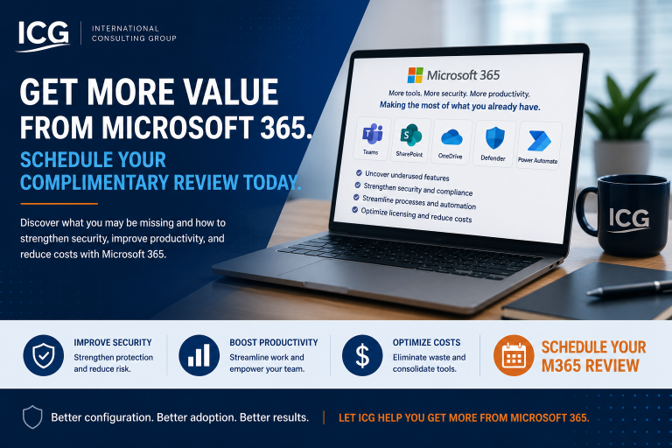
Ready to See What You May Be Missing in Microsoft 365?
If your Microsoft 365 environment has not been reviewed recently, there may be security, productivity, and cost-saving opportunities hiding in plain sight.
ICG can help you understand what you are using, what you are missing, and what can be improved.
Click Here: To Schedule Your Microsoft 365 Review
No obligation. We'll help you identify practical opportunities to improve how your business uses Microsoft 365.
Related Questions Businesses Ask About Microsoft 365
Is Microsoft 365 only for email and Office apps?
No. Microsoft 365 includes productivity, collaboration, security, compliance, automation, and device management tools. Many businesses use only the basic features and overlook higher-value capabilities.
Can Microsoft 365 replace other business tools?
In some cases, yes. Microsoft 365 may already include capabilities that overlap with separate file-sharing, collaboration, task management, or workflow tools. A review can help determine where consolidation makes sense.
Why is Microsoft 365 optimization important?
Optimization helps ensure your business is using Microsoft 365 securely and efficiently. It can uncover unused features, reduce unnecessary costs, improve collaboration, and strengthen security.
Frequently Asked Questions About Microsoft 365 for Small Businesses
What is Microsoft 365 for small businesses?
Microsoft 365 for small businesses is a cloud-based platform that includes email, Office apps, file storage, collaboration tools, security features, device management, and productivity solutions.
What are small businesses usually missing in Microsoft 365?
Many small businesses underuse Teams, SharePoint, OneDrive governance, SharePoint, OneDrive, and Teams security scanning, Conditional Access, Power Automate, data protection, and compliance tools.
Is Microsoft 365 secure by default?
Microsoft 365 includes strong security capabilities, but they must be configured properly. Default settings are not always enough to meet the needs of every business.
How often should Microsoft 365 be reviewed?
Most businesses should review Microsoft 365 at least once per year or after major changes such as growth, new compliance requirements, staff turnover, or security incidents.
Can Microsoft 365 improve productivity?
Yes. When properly configured, Microsoft 365 can improve collaboration, reduce manual work, streamline file access, and help employees work more efficiently.
Can Microsoft 365 reduce IT costs?
Microsoft 365 can help reduce costs by consolidating tools, improving license usage, reducing manual work, and replacing certain overlapping third-party solutions.
What is included in a Microsoft 365 review?
A Microsoft 365 review may include:
- Licensing review
- Security settings assessment
- Teams and SharePoint structure
- User access and permissions
- External sharing configuration
- Connected apps and integrations
- Collaboration security scanning
- Automation opportunities
- Data protection controls




.png)