


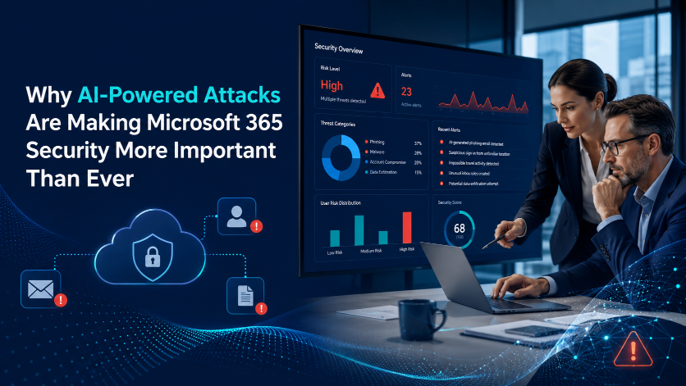
AI is changing how cyberattacks happen.
For years, many small and mid-sized businesses could identify suspicious emails because they looked unusual. Poor grammar, strange wording, obvious requests, and unfamiliar formatting made many phishing attempts easier to spot.
That is no longer the case.
Attackers can now use AI tools to create more convincing emails, imitate normal business communication, personalize messages, and scale attacks faster than before. This makes Microsoft 365 security more important than ever because email, Teams, SharePoint, OneDrive, and user identities are often where business communication and sensitive information live.
For business leaders, the concern is not just that attacks are becoming more technical.
The bigger issue is that attacks are becoming more believable.
AI Cyberattacks and Microsoft 365 Security: Quick Overview
AI-powered cyberattacks use artificial intelligence to make common threats faster, more convincing, and harder to detect.
For small and mid-sized businesses, this can affect Microsoft 365 in several ways:
- More realistic phishing emails
- Better impersonation of executives, vendors, and employees
- More convincing credential theft attempts
- Faster creation of malicious messages
- More personalized social engineering
- Increased risk to email, Teams, SharePoint, and OneDrive
- Greater pressure on identity and access controls
Microsoft 365 is a major part of how modern businesses communicate and store information. That makes it a valuable target.
The good news is that Microsoft 365 includes many security capabilities that can help reduce risk, but they need to be reviewed, configured, and managed properly.
Why AI Is Changing the Threat Landscape
Traditional phishing attacks often relied on volume.
Attackers would send large numbers of generic messages and hope someone clicked. Many of those emails were easy to recognize because they were poorly written or clearly suspicious.
AI changes that.
With AI, attackers can create emails that sound more natural, match a specific tone, and appear more relevant to the recipient. A phishing email can look like a normal vendor follow-up, internal request, invoice question, HR message, or file-sharing notification.
This makes awareness alone less reliable.
Employees can still be trained to spot warning signs, but the quality of malicious messages is improving. That means businesses need stronger technical controls in addition to user education.
Why Microsoft 365 Is a Common Target
Microsoft 365 is where many businesses operate every day.
Employees use it for email, meetings, files, collaboration, calendars, document sharing, and internal communication. Because so much business activity happens inside Microsoft 365, attackers often focus on gaining access to user accounts.
If an attacker compromises a Microsoft 365 account, they may be able to:
- Read email conversations
- Send messages from a trusted account
- Access shared files
- Create forwarding rules
- Attempt invoice or payment fraud
- Use Teams or email to contact other employees
- Search for sensitive information
- Access connected third-party applications
This is why identity security is so important.
In many modern attacks, the goal is not to break into a server. The goal is to trick a user, steal credentials, and gain access through a legitimate account.
How AI-Powered Attacks Show Up in Real Business Environments
AI-powered attacks do not always look dramatic.
In many cases, they look like normal business communication.
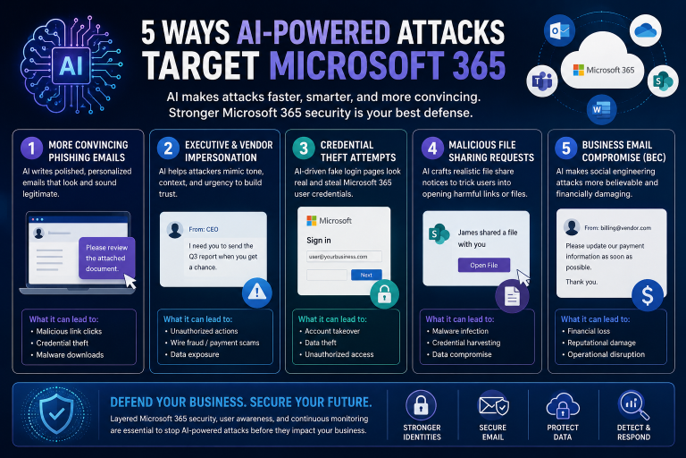
1. More Convincing Phishing Emails
AI can help attackers write phishing emails that are clear, polished, and relevant.
Instead of obvious spam, employees may receive messages that look like normal requests for document review, password verification, payment confirmation, or account updates.
The email may use business-friendly language and avoid the obvious mistakes employees were trained to watch for.
2. Executive and Vendor Impersonation
AI can make impersonation attempts more believable.
An attacker may pretend to be a company leader, vendor, client, or employee. The message may reference a real project, a common business process, or a familiar type of request.
This increases the risk of employees trusting the message and taking action too quickly.
3. Credential Theft Attempts
Many attacks are designed to steal Microsoft 365 login credentials.
The user may be sent to a fake login page that looks like Microsoft, SharePoint, OneDrive, or another familiar system. If credentials are entered, attackers may attempt to access the account immediately.
If MFA is weak, misconfigured, or not enforced consistently, the risk increases.
4. Malicious File-Sharing Requests
Because Microsoft 365 is used heavily for collaboration, attackers may send fake file-sharing notifications.
These messages may appear to come from SharePoint, OneDrive, Teams, DocuSign, Adobe, or another business platform. The goal is to get the user to click a link, open a file, or enter credentials.
5. Business Email Compromise
Business Email Compromise happens when attackers use email access or impersonation to influence business decisions.
This may involve fake invoice changes, payment requests, payroll changes, or urgent executive instructions. AI can make these messages sound more professional and less suspicious.
For SMBs, even one successful Business Email Compromise incident can create financial loss, operational disruption, and loss of trust.
Why Default Microsoft 365 Security Settings Are Not Enough
Microsoft 365 includes strong security capabilities, but businesses should not assume the environment is fully protected just because Microsoft 365 is in place.
Default settings are designed to help organizations get started. They are not automatically tailored to your business, users, access patterns, data sensitivity, cyber insurance requirements, or risk profile.
Common gaps may include:
- MFA not enforced consistently
- Conditional Access not fully configured
- Admin accounts not properly restricted
- External sharing settings too broad
- Users with unnecessary permissions
- Limited visibility into suspicious sign-ins
- Weak controls around third-party connected apps
- Insufficient monitoring of SharePoint, OneDrive, and Teams activity
- Email security settings not reviewed regularly
As AI-powered attacks become more convincing, these gaps matter more.
A business can have Microsoft 365 and still be exposed if the right settings are not configured and monitored.
What Businesses Should Review in Microsoft 365
Business leaders do not need to know every technical setting inside Microsoft 365, but they should know whether the environment has been reviewed properly.
1. Multi-Factor Authentication
MFA is one of the most important controls for protecting user accounts. Businesses should confirm that MFA is enforced consistently, especially for administrators and users with access to sensitive information.
2. Conditional Access
Conditional Access allows businesses to apply smarter access rules based on factors like location, device, risk, and user role. This can help reduce the risk of unauthorized access when login behavior looks unusual.
3. Admin Account Protection
Administrator accounts should be tightly controlled. Businesses should review who has admin access, whether those accounts are protected with stronger controls, and whether privileges are limited to only what is needed.
4. Email Security Settings
Email remains one of the most common attack paths. Microsoft 365 email security should be reviewed to help reduce phishing, spoofing, malicious links, and suspicious attachments.
5. SharePoint, OneDrive, and Teams Security
Sensitive data often lives in SharePoint, OneDrive, and Teams. Businesses should review file sharing, external access, guest permissions, and activity monitoring. ICG’s approach can include scanning and visibility across SharePoint, OneDrive, and Teams to help identify risky activity or exposure.
6. Connected Apps and OAuth Permissions
Users may grant third-party applications access to Microsoft 365 data. These connections should be reviewed because unused, unnecessary, or overly permissive apps can increase risk.
7. Security Monitoring and Alerting
Security tools are only useful if someone is reviewing alerts and responding appropriately. Businesses should understand who monitors Microsoft 365 security events, how alerts are handled, and what happens when suspicious activity is detected.
Related Resource
For a broader look at how cybersecurity risk affects small and mid-sized businesses, read our Cybersecurity for Small Businesses: The Complete Guide: https://www.icgi.com/blogs/cybersecurity-for-small-businesses-the-complete-guide
For more on how ICG helps businesses modernize and secure Microsoft cloud environments, visit our Microsoft Cloud services page: https://www.icgi.com/solutions/microsoft-cloud-services
How Better Microsoft 365 Security Reduces Business Risk
Improving Microsoft 365 security is not just about preventing cyberattacks.
It also helps reduce business disruption.
When Microsoft 365 is configured properly, businesses gain better control over access, sharing, identity, and collaboration. This makes it harder for attackers to abuse user accounts, move through the environment, or access sensitive data.
Better Microsoft 365 security can help businesses:
- Reduce phishing success
- Protect user accounts
- Limit unnecessary access
- Improve visibility into risky behavior
- Control external sharing
- Strengthen cyber insurance readiness
- Reduce data exposure risk
- Improve response when suspicious activity occurs
The goal is not to make work harder for employees.
The goal is to make secure work easier and reduce the chance that one mistake becomes a major incident.
Why Awareness Training Alone Is Not Enough
Employee awareness is still important.
Users should know how to recognize suspicious messages, verify unusual requests, and report potential threats. But as AI makes phishing more realistic, businesses cannot rely on training alone.
Security needs layers.
That means combining user education with technical controls such as MFA, Conditional Access, email protection, file sharing governance, monitoring, and incident response planning.
The stronger the layers, the less likely one mistake will turn into a serious business problem.
What Business Leaders Should Ask
If your organization uses Microsoft 365, it is worth asking whether your security configuration has kept pace with today’s threats.
Key questions include:
- Is MFA enforced for all users?
- Are Conditional Access policies configured?
- Are administrator accounts tightly controlled?
- Are suspicious sign-ins monitored?
- Are email security settings reviewed regularly?
- Are SharePoint, OneDrive, and Teams sharing settings controlled?
- Do we know which external users have access?
- Are third-party connected apps reviewed?
- Do we have visibility into risky activity?
- Do we know what happens when an account is compromised?
These questions help shift the conversation from “Do we have Microsoft 365?” to “Is Microsoft 365 secured properly?”
How ICG Helps Strengthen Microsoft 365 Security
ICG helps businesses review and strengthen Microsoft 365 security with a practical, business-focused approach.
Our team looks at how Microsoft 365 is configured today, where security gaps may exist, and which improvements should be prioritized. This may include identity security, MFA, Conditional Access, admin account review, email security, external sharing controls, connected app review, and SharePoint, OneDrive, and Teams scanning.
We focus on helping businesses reduce risk without adding unnecessary complexity.
The goal is to help your Microsoft 365 environment better protect your users, data, and business operations.
Ready to Review Your Microsoft 365 Security?
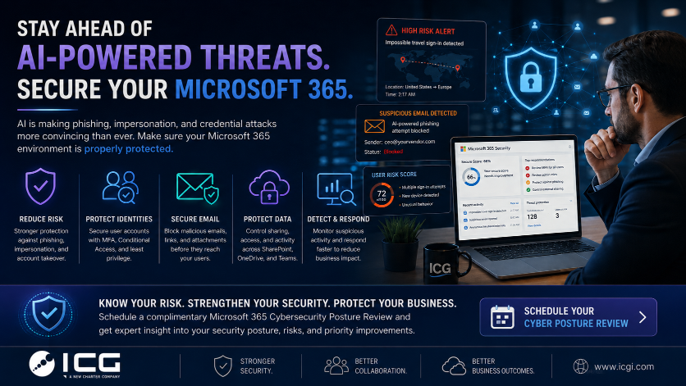
AI-powered attacks are making phishing, impersonation, and credential theft more convincing.
If your Microsoft 365 environment has not been reviewed recently, now is the time to confirm whether your security settings are keeping up.
ICG can help you identify gaps, prioritize improvements, and strengthen your Microsoft 365 environment.
Schedule Your Cybersecurity Posture Review: https://bookings.cloud.microsoft/book/ComplimentaryAssessmentDiscussion@home.icgi.com/?ismsaljsauthenabled
No obligation. We’ll help you identify practical opportunities to reduce risk and improve Microsoft 365 security.
Related Questions Businesses Ask About AI and Microsoft 365 Security
Are AI-powered cyberattacks only a concern for large companies?
No. AI-powered attacks can affect businesses of all sizes. Small and mid-sized businesses are often targeted because attackers know they may have fewer security resources and less mature controls.
Can AI make phishing emails harder to spot?
Yes. AI can help attackers write more polished, relevant, and believable phishing emails. This makes it harder for employees to rely only on grammar mistakes or obvious red flags.
Is Microsoft 365 secure enough out of the box?
Microsoft 365 includes strong security capabilities, but the environment still needs to be configured, reviewed, and managed properly. Default settings may not be enough for every business.
Frequently Asked Questions About AI Cyberattacks and Microsoft 365 Security
What are AI-powered cyberattacks?
AI-powered cyberattacks use artificial intelligence to create more convincing, personalized, or scalable attacks. This may include phishing emails, impersonation attempts, credential theft, and social engineering.
Why do AI cyberattacks matter for Microsoft 365?
Microsoft 365 is where many businesses manage email, files, collaboration, meetings, and user identities. If attackers compromise a Microsoft 365 account, they may gain access to sensitive business information.
How can AI improve phishing attacks?
AI can help attackers write emails that sound more natural, match business language, personalize messages, and avoid obvious grammar or formatting mistakes.
What Microsoft 365 security settings should businesses review?
Businesses should review MFA, Conditional Access, admin roles, email security, external sharing, SharePoint and OneDrive permissions, Teams guest access, connected apps, and monitoring.
Does MFA stop all Microsoft 365 attacks?
No. MFA is important, but it is not the only control needed. Businesses should also review Conditional Access, admin privileges, email security, file sharing, and monitoring.
How often should Microsoft 365 security be reviewed?
Most businesses should review Microsoft 365 security at least annually, and more often after major business changes, security incidents, cyber insurance renewals, or changes in Microsoft licensing.
Can ICG help review Microsoft 365 security?
Yes. ICG can help businesses evaluate Microsoft 365 security settings, identify gaps, prioritize improvements, and strengthen protections across identity, email, SharePoint, OneDrive, Teams, and connected applications.

.png)