



The warning signs business leaders shouldrecognize before a small problem becomes a major disruption
Recent threat research is a useful reminder that a cyberattack does not always look like a cyberattack. In late September, Microsoft reported phishing campaigns that delivered legitimate remote-management software and then used it to maintain persistent access. Earlier in the month, Microsoft documented identity-focused attacks in which unusual sign-ins were followed by unauthorized authentication changes and access to Microsoft 365 data. Learn more about Microsoft Cloud Services.
For a business leader, the takeaway is straightforward: compromise can hide inside activity that looks almost normal.
An employee suddenly cannot log in. A vendor asks why your banking instructions changed. Emails start disappearing. A customer says they received a message your employee did not send. Or someone outside the business seems to know internal details they should not know.
Any one of those events may have an innocent explanation. Together, they can be signs that someone else has access to your systems, your email, or your business information. The faster your organization recognizes suspicious activity, the faster it can investigate and contain the problem.
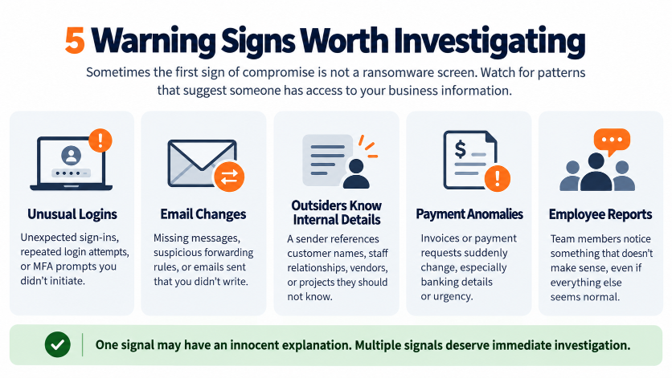
1. Unusual Login Activity Appears
One of the clearest warning signs is account activity that does not match how an employee normally works. That can include repeated login attempts, sign-ins from unfamiliar locations or devices, unexpected account lockouts, or multifactor authentication prompts the employee did not initiate.
Microsoft Entra ID Protection identifies risk signals such as unfamiliar sign-in properties, atypical travel, anonymous IP addresses, anomalous tokens, and other indicators that may warrant investigation. Not every alert means an account has been compromised, but a pattern of unusual activity should not be ignored.
For executives, the practical question is simple: if someone tried to access an employee account from an unusual place tonight, would anyone know?
2. Email Starts Behaving Differently
Email compromise can be difficult to notice because the attacker may want the mailbox to continue operating normally. Instead of locking the user out, the attacker may create rules that forward, move, hide, or delete messages.
Microsoft lists suspicious inbox rules, unexplained external forwarding, missing messages, unusual sent items, password changes, and unexplained lockouts among the symptoms that can indicate a compromised Microsoft 365 mailbox.
Watch especially closely when the mailbox belongs to an executive, finance employee, human-resources user, or anyone involved in payments. A compromised inbox can provide enough context for an attacker to impersonate the right person at exactly the right moment.
3. An Outsider Knows More About Your Business Than They Should
Sometimes the warning sign is not a strange login or a slow computer. It is when someone outside your organization appears to know information that should not be easy for them to know.
Employee names by themselves are not always suspicious. Staff information can often be found on websites, LinkedIn, email signatures, or social media. The concern becomes much greater when a sender references non-public details such as customer names, vendor relationships, invoice timing, internal reporting relationships, projects in progress, or who approves payments.
That kind of knowledge can indicate that someone has access to a mailbox, a contact list, previous email threads, or shared files. For leadership, the right question is simple: “How would this person know that?” If there is no reasonable public source for the information, it deserves investigation.
4. A Payment Request Suddenly Changes
Sometimes the first visible sign of a cyber incident is not technical at all. It is financial.
A vendor may appear to send new banking instructions. An executive may appear to request an urgent wire. An employee may receive an invoice that looks nearly identical to a normal one except for the account information.
The FBI reported approximately $3 billion in Business Email Compromise losses during 2025. That figure is based on complaints reported to the Internet Crime Complaint Center, so it does not represent every loss, but it shows why payment anomalies deserve immediate attention.
Unexpected changes involving wire instructions, ACH payments, payroll, direct deposit, gift cards, or vendor banking information should be independently verified using a trusted phone number or other established process.
5. Computers or Systems Begin Acting Strangely
A slow computer does not automatically mean the business has been hacked. Systems slow down for ordinary reasons. But unexplained changes can become meaningful when they appear alongside other warning signs.
Examples include security tools becoming disabled, unfamiliar software appearing, unexpected remote-access tools, unusual file activity, repeated crashes, or systems behaving differently without an approved change.
The late-September Microsoft campaign is a good example of why this can be subtle: attackers abused legitimate remote-management software, including ScreenConnect, rather than exploiting ScreenConnect itself. To an employee, the software could look like normal IT activity. To the security team, an unapproved installation or an unusual remote-access session may be the important clue.
6. Employees, Customers, or Vendors Notice Something That Does Not Add Up
People are often one of the earliest sources of useful information.
An employee may report an MFA request they did not initiate, a password that suddenly stopped working, or a support session they did not expect. A customer may say they received an unusual attachment. A vendor may question a payment request. A business partner may say an email from one of your employees does not sound right.
Those reports should not be dismissed simply because everything else appears to be functioning. Recent Microsoft research on identity-focused social engineering showed that attackers can use legitimate authentication flows and then quietly access Microsoft 365 services such as SharePoint, OneDrive, and Exchange. The user may notice only a small piece of the larger activity.
Treat those reports as potential security signals. Verify whether the communication actually came from your environment and whether the account or device involved shows other suspicious activity.
What Should You Do If You Suspect a Compromise?
The first priority is to contain the situation without destroying useful evidence.
Contact your IT or cybersecurity team immediately. Depending on the incident, the response may include isolating affected devices, reviewing sign-in activity and mailbox rules, resetting compromised credentials, revoking active sessions, removing unauthorized authentication methods, preserving logs, and checking for additional affected users or devices.
The Federal Trade Commission recommends moving quickly to stop additional data loss, mobilizing the incident-response team, preserving evidence, and fixing the weakness that allowed the incident to occur. For infected devices, the FTC advises disconnecting them from the network without automatically powering them down, because useful investigative information can be lost.
If money may have been sent fraudulently, contact the financial institution immediately. Cyber-insurance notification requirements, legal obligations, customer notification, and law-enforcement reporting should also be evaluated based on the facts of the incident.
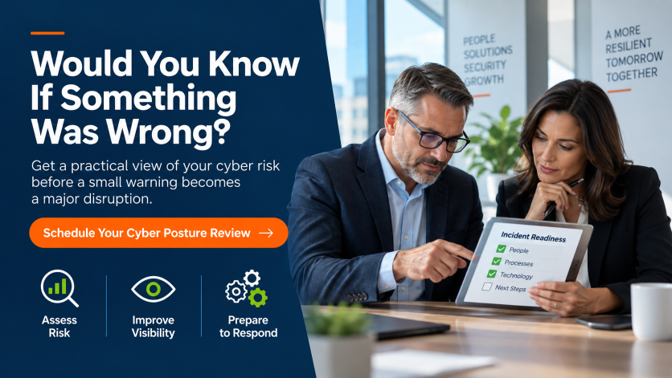
The Bigger Question: Would You Know?
Most executives do not need another cybersecurity dashboard. They need confidence that the right signals are being watched and that someone knows what to do when those signals appear.
Would you know if an employee account started signing in from unusual locations? If email was quietly being forwarded outside the company? If an outsider seemed to know the names of your customers or the details of an upcoming payment? If a new remote-access tool appeared on a workstation? If an employee or customer said something about a recent communication did not make sense?
Those questions are part of cybersecurity maturity. Technology can help prevent attacks, but monitoring, defined response processes, and people who know what to look for are what help a business recognize trouble early.
For a broader view of the safeguards small and mid-sized businesses should have in place, see ICG’s Cybersecurity for Small Businesses: The Complete Guide.
You do not have to wait for an obvious breach to understand your exposure. An ICG Cyber Posture Review can help identify security gaps, evaluate visibility across critical systems, and give leadership a clearer picture of where additional attention may be needed.
The goal is not to create fear. It is to make sure that if something unusual happens, your business has the visibility, people, and process to recognize it and respond.
Frequently Asked Questions
How Can I Tell If Someone Has Accessed Our Business Email?
Warning signs can include unfamiliar sign-ins, unexpected forwarding or inbox rules, messages you did not send, missing emails, unexplained password changes, or customers receiving suspicious messages from your account. These are indicators to investigate, not proof on their own.
Is It Suspicious If an Outsider Knows Employee Names or Customer Names?
Employee names alone are not always suspicious because that information can be public. The concern grows when a sender knows non-public details such as customer names that are not published, internal relationships, invoice timing, projects, or who approves payments.
Does a Slow Computer Mean It Has Been Hacked?
Not necessarily. Performance problems have many legitimate causes. However, unexplained slowdowns combined with disabled security tools, unfamiliar applications, unexpected remote-access software, or other unusual activity should be investigated.
What Should an Employee Do If They Receive an MFA Request They Did Not Initiate?
They should deny the request and report it immediately to the organization’s IT or security team. An unexpected authentication request can indicate that someone else is attempting to access the account.
Should I Turn Off a Computer If I Think It Has Been Compromised?
Not automatically. The FTC recommends disconnecting an infected device from the network without powering it down when practical, because shutting it off can remove information that may be useful to an investigation.
When Should a Suspected Cyber Incident Become an Executive Issue?
When it may affect operations, sensitive information, financial transactions, customers, regulatory obligations, insurance coverage, or reputation. Leadership does not need to perform the technical investigation, but it should understand the potential business impact and confirm that the response process is being followed.
.png)