




Many small and mid-sized businesses still rely on on-premise servers, local file storage, older remote access tools, or private data center environments to run daily operations. While that model worked for years, today's business landscape requires greater flexibility, security, and resilience.
As organizations become more dependent on remote access, cybersecurity, disaster recovery, and scalable technology, many leaders are asking the same question:
Does it still make sense to keep critical systems tied to physical servers and aging infrastructure?
That's why cloud migration has become more than an IT project—it's now a business strategy conversation.
Moving to the cloud can help organizations improve flexibility, reduce hardware dependency, strengthen resilience, and create a more modern foundation for growth.
Moving Business to the Cloud: Quick Overview
Moving a business to the cloud means shifting key systems, applications, files, servers, or desktops from local infrastructure to cloud-based platforms.
For small and mid-sized businesses, this may include:
- Moving email and files to Microsoft 365
- Replacing local file servers with SharePoint, OneDrive, or cloud storage
- Hosting business applications in Microsoft Azure
- Using Azure Virtual Desktop for secure remote access
- Improving backup, disaster recovery, and business continuity
- Reducing dependence on aging physical servers
The goal isn't simply to move servers somewhere else. The goal is to modernize how your business accesses, protects, and manages technology.
What Does "Moving to the Cloud" Actually Mean?
For many business leaders, "the cloud" can sound vague.
In simple terms, moving to the cloud means your technology is no longer fully dependent on equipment sitting in your office or server room. Instead, certain systems are hosted in secure cloud environments and accessed through the internet.
This doesn't mean everything changes overnight. It also doesn't mean your business loses control of its data.
A cloud migration may involve moving only certain systems first, such as:
- File storage
- Backups
- Remote desktops
- Business applications
For many organizations, a phased migration approach reduces disruption and allows systems to be moved in the right order.
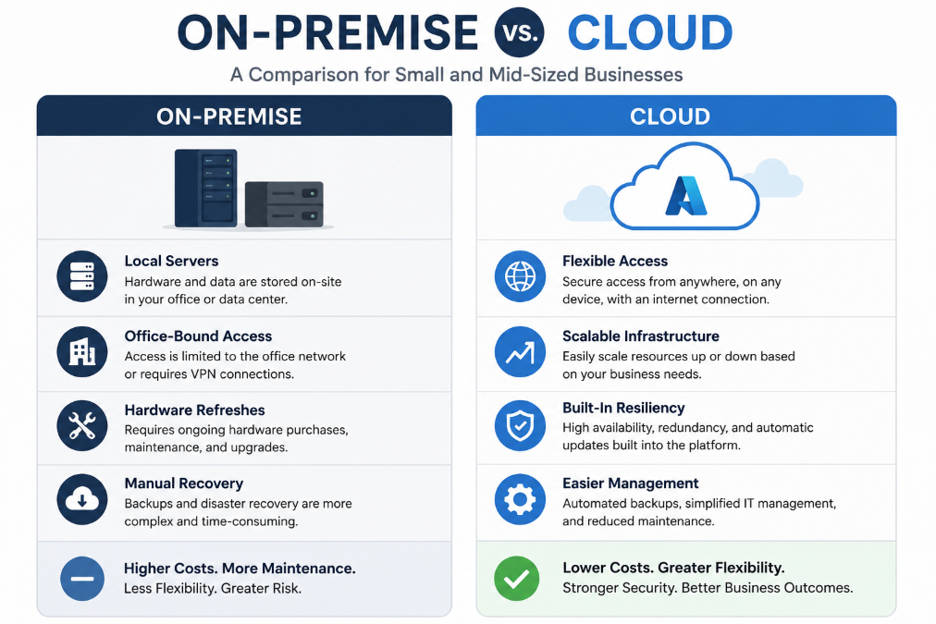
Why Businesses Are Moving Away from On-Premise Servers
While on-premise servers can still serve a purpose, they often create challenges as businesses grow.
Physical infrastructure requires ongoing:
- Maintenance
- Hardware refreshes
- Monitoring
- Backup planning
- Warranty tracking
- Replacement budgeting
Common challenges include:
- Aging hardware
- Limited remote access flexibility
- Higher disaster recovery complexity
- Server replacement costs
- Dependence on office connectivity and power
- Difficult scalability
- Increased cybersecurity management requirements
Cloud platforms help businesses reduce these dependencies and focus on performance, security, accessibility, and growth.
What Changes for Employees After a Cloud Migration?
One of the most common concerns is whether cloud migration will disrupt employees.
When planned correctly, the employee experience should improve—not become more complicated.
Employees often experience:
- Easier access to files and applications
- Better remote work capabilities
- More consistent access across locations
- Reduced reliance on VPNs
- Improved collaboration through Microsoft 365
- Faster recovery when devices fail
The goal is to make work more flexible while maintaining strong security controls.
What Stays the Same?
Moving to the cloud doesn't mean abandoning the tools and workflows employees rely on every day.
In many cases, users continue accessing the same applications and data while the underlying infrastructure is modernized.
What often remains unchanged:
- Core business applications
- User identities and permissions
- File organization structure
- Daily workflows
- Security policies
- Support processes
A successful migration should feel like an improvement—not a complete reset.
Common Misconceptions About Cloud Migration
"The cloud is less secure."
Cloud security depends on design and management. Properly configured cloud environments can provide strong identity controls, monitoring, backup options, and access management.
"Everything has to move at once."
Most businesses benefit from a phased migration approach that prioritizes systems based on business needs and risk.
"The cloud is always more expensive."
Cloud costs depend on design, usage, licensing, and management. While cloud services introduce recurring costs, they can reduce hardware spending, maintenance, downtime, and disaster recovery expenses.
"Our business is too small for the cloud."
Small and mid-sized businesses often benefit the most because they gain access to enterprise-grade infrastructure without building it themselves.
Business Benefits of Moving to the Cloud
Better Flexibility
Support remote work, hybrid teams, and multi-location operations with secure access from virtually anywhere.
Improved Resilience
Cloud environments can improve backup, recovery, and business continuity when properly designed.
Easier Scalability
Adjust resources as your business grows without major hardware purchases.
Stronger Security Options
Platforms like Microsoft 365 and Azure include advanced capabilities such as:
- Identity protection
- Conditional Access
- Logging and monitoring
- Secure remote access
Reduced Hardware Dependency
Spend less time maintaining servers and more time supporting business objectives.
How Cloud Migration Supports Cybersecurity
Cloud migration and cybersecurity go hand in hand.
Many legacy environments rely on outdated remote access tools, inconsistent patching, and limited monitoring.
Migration creates an opportunity to modernize security by implementing:
- Multi-factor authentication (MFA)
- Stronger identity controls
- Conditional Access policies
- Centralized monitoring
- Improved backup and recovery
- Better access management
- More secure remote access methods
What Business Leaders Should Evaluate Before Moving to the Cloud
Before beginning a migration, consider:
- Which systems are still on-premise?
- Which applications are business-critical?
- Which workloads can move easily?
- How are employees accessing systems remotely?
- Are backups tested and reliable?
- What security controls currently exist?
- What compliance requirements apply?
- What user experience should employees have after migration?
The answers help determine the right migration strategy.
What a Cloud Migration Plan Should Include
A successful migration should include:
- Current environment assessment
- Application and server inventory
- Security review
- Backup and disaster recovery review
- Migration timeline
- User communication plan
- Testing and validation
- Employee training
- Post-migration support
- Long-term optimization roadmap
Planning is what prevents cloud migration from becoming disruptive.
How ICG Helps Businesses Move from On-Premise to Cloud
ICG helps businesses evaluate, plan, and execute cloud migrations with a focus on:
- Security
- Reliability
- Business continuity
- Scalability
We begin by understanding your current environment, identifying risks, and building a roadmap aligned with your business goals.
Whether the solution involves Microsoft 365, Azure, Azure Virtual Desktop, cloud backup, identity security, or modern access controls, the objective remains the same:
Help your business operate in a more secure, flexible, and scalable way.
The Bottom Line
Moving from on-premise infrastructure to the cloud is more than a technology decision.
It affects:
- How employees work
- How systems are secured
- How your business recovers from disruptions
- How technology supports future growth
For many SMBs, cloud migration provides a stronger foundation than aging infrastructure and reactive IT planning.
Success, however, depends on the right strategy, design, and implementation partner.
Cloud migration should make your business more resilient—not more complicated.
Ready to Evaluate Your Cloud Readiness?
If your business still depends on on-premise servers, aging infrastructure, or outdated remote access tools, now is a great time to evaluate your options.
ICG can help you understand where your environment stands today and what a practical cloud roadmap could look like.
Schedule Your Cybersecurity Posture Review
No obligation. We'll help you identify risks, modernization opportunities, and practical next steps.
Frequently Asked Questions
What does moving a business to the cloud mean?
Moving to the cloud means shifting systems, applications, files, desktops, or infrastructure from local servers to cloud-based platforms.
Why are small businesses moving to the cloud?
To improve flexibility, strengthen disaster recovery, reduce hardware dependency, and modernize their IT environment.
Is the cloud secure for small businesses?
Yes—when properly configured and managed with strong identity controls, access policies, monitoring, and backup strategies.
How long does a cloud migration take?
The timeline depends on the size and complexity of the environment. Some projects take weeks, while others are completed in phases over several months.
What should I move to the cloud first?
Many businesses begin with email, file storage, backups, or remote access improvements.
Can cloud migration reduce IT costs?
It can reduce hardware replacement, maintenance, and downtime costs, though proper planning is essential to maximize value.
How do I know if my business is ready for the cloud?
A cloud readiness assessment can evaluate your infrastructure, applications, security controls, and business objectives to determine the best migration path.
.png)