



Microsoft 365 is one of the most important platforms inside your business.
It supports email, file storage, collaboration, meetings, user access, and daily communication. It may also contain sensitive client data, financial records, employee information, contracts, and business-critical documents.
That makes Microsoft 365 one of the first places your business should review when evaluating cybersecurity risk.
Many small and mid-sized businesses assume that because Microsoft 365 is cloud-based, it is automatically secure. But Microsoft 365 security depends on how the environment is configured, monitored, and managed.
A Microsoft 365 security assessment helps business leaders understand what is working, what is missing, and where security gaps may exist.
The goal is not to make Microsoft 365 more complicated. The goal is to make it safer, more manageable, and better aligned with how your business operates today.
Microsoft 365 Security Assessment: Quick Overview
A Microsoft 365 security assessment is a structured review of your Microsoft 365 environment to identify security gaps, misconfigurations, risky permissions, and opportunities to strengthen protection.
For small and mid-sized businesses, this may include reviewing:
- Multi-factor authentication
- Conditional Access policies
- Administrator permissions
- Email security settings
- Phishing and impersonation protection
- SharePoint and OneDrive sharing
- Microsoft Teams guest access
- Connected applications
- User access and stale accounts
- Security alerts and monitoring
- Backup and recovery readiness
- Data protection and governance
A good assessment does more than produce a technical checklist. It helps business leaders understand where risk exists, which issues matter most, and what practical steps should happen next.
Why Microsoft 365 Security Assessments Matter
Microsoft 365 environments change constantly.
Users are added and removed. Teams are created. Files are shared. External guests are invited. Apps are connected. Admin permissions change. New features are released. Security threats evolve.
Over time, even a well-configured Microsoft 365 environment can develop gaps.
Common examples include:
- Former employees still having access
- Users with unnecessary permissions
- Admin accounts with too much privilege
- External sharing settings that are too broad
- Teams guests who no longer need access
- Mailbox forwarding rules created without oversight
- Connected apps with excessive permissions
- MFA exceptions that were never revisited
- Security alerts that are not actively reviewed
These issues often do not appear all at once. They build quietly over time. That is why Microsoft 365 security should be assessed regularly, not only after something goes wrong.
What a Microsoft 365 Security Assessment Should Review
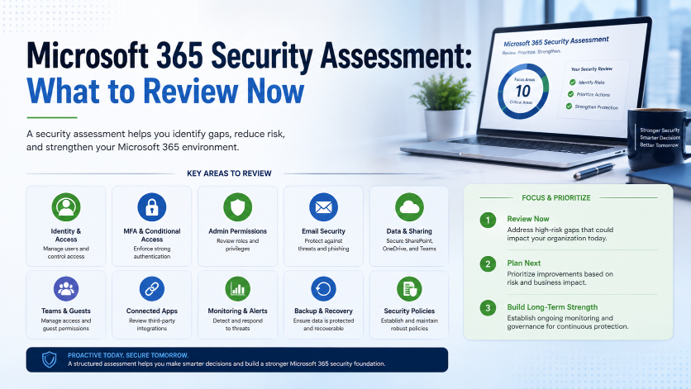
A strong Microsoft 365 security assessment should look across identity, email, collaboration, file sharing, applications, monitoring, and recovery. Here are the key areas business leaders should expect to review.
1. User Accounts and Identity Security
User accounts are one of the most important areas to assess.
In many modern attacks, the goal is to compromise a user account and gain access through legitimate credentials. Once inside, an attacker may be able to read email, access files, create mailbox rules, impersonate users, or attempt financial fraud.
A Microsoft 365 security assessment should review active users, disabled users, stale accounts, former employee access, shared accounts, guest users, password and sign-in policies, risky sign-in activity, user roles, and permissions.
The goal is to make sure only the right people have access — and only to what they need.
2. Multi-Factor Authentication
Multi-factor authentication is one of the most important protections for Microsoft 365 accounts.
But simply having MFA available is not enough. An assessment should confirm whether MFA is actually enforced across users, administrators, and sensitive access scenarios. It should also review whether exceptions exist and whether those exceptions are still valid.
MFA should be treated as a baseline security control, not an optional setting.
3. Conditional Access Policies
Conditional Access helps businesses apply smarter access rules based on risk.
Instead of treating every login the same, Conditional Access can evaluate factors such as user role, location, device, application, and sign-in risk.
A Microsoft 365 security assessment should review whether Conditional Access policies are configured to support the business, including blocking risky locations, requiring MFA for certain conditions, restricting access from unmanaged devices, applying stronger controls to administrators, protecting sensitive applications, reviewing policy exclusions, and confirming policies do not create unnecessary disruption.
Conditional Access can significantly improve security when configured thoughtfully. It helps balance protection with usability.
4. Administrator Permissions
Administrator accounts carry higher risk.
If an attacker compromises an administrator account, they may be able to change security settings, access sensitive data, create new accounts, modify permissions, or disable protections.
A security assessment should review who has admin access and whether that access is appropriate. Reducing unnecessary administrator access is one of the most practical ways to lower Microsoft 365 risk.
5. Email Security and Phishing Protection
Email remains one of the most common attack paths for small and mid-sized businesses.
A Microsoft 365 security assessment should review whether email security settings are properly configured to reduce phishing, impersonation, spoofing, malicious attachments, and unsafe links.
Areas to review include anti-phishing policies, anti-spam settings, anti-malware settings, impersonation protection, spoofing controls, mailbox forwarding rules, suspicious inbox rules, Safe Links and Safe Attachments where applicable, SPF, DKIM, and DMARC configuration, and user reporting processes.
This is especially important as AI-powered phishing becomes more polished and harder for users to detect. Email security should be reviewed regularly because attacker tactics continue to change.
6. SharePoint and OneDrive Sharing
SharePoint and OneDrive help businesses collaborate, but they can also create data exposure risk if sharing settings are too open.
A Microsoft 365 security assessment should review how files are stored, shared, and accessed. Important areas include external sharing settings, anonymous sharing links, link expiration policies, site ownership, folder permissions, sensitive file locations, guest access, inactive or outdated shared links, user access to confidential data, and data exposure risks.
Many businesses do not realize how much sensitive information is stored in SharePoint and OneDrive until a review is completed. Secure collaboration requires both usability and control.
7. Microsoft Teams Guest Access and Collaboration
Microsoft Teams is often used daily for meetings, chat, file sharing, and project collaboration.
But Teams also connects closely to SharePoint and OneDrive, which means Teams security cannot be reviewed in isolation.
An assessment should review guest access settings, external collaboration policies, which Teams allow outside users, who can invite guests, whether old guests still have access, Team ownership, channel structure, file sharing within Teams, meeting and communication settings, and Teams connected to sensitive data.
The goal is not to limit collaboration unnecessarily. The goal is to ensure Teams supports productivity without creating unmanaged access to business data.
8. Connected Apps and OAuth Permissions
Connected applications can create hidden risk inside Microsoft 365.
Users may grant third-party apps access to email, calendars, files, contacts, or other Microsoft 365 data. Some apps are legitimate and necessary. Others may no longer be used or may have broader permissions than needed.
A Microsoft 365 assessment should review:
- Which apps are connected
- What permissions each app has
- Which users approved them
- Whether admin consent is required
- Whether unused apps should be removed
- Whether risky permissions exist
- Whether application access aligns with business needs
If your business does not regularly review connected apps, you may not know which external services can access Microsoft 365 data. That lack of visibility creates risk.
9. Security Alerts and Monitoring
Security tools only help if alerts are reviewed and acted on.
A Microsoft 365 security assessment should evaluate whether suspicious activity is being monitored and whether there is a clear process for response.
Important questions include:
- Whether suspicious sign-ins are reviewed
- Risky users are monitored
- Mailbox forwarding rules are detected
- External sharing activities are reviewed
- Failed login attempts are monitored
- Admin activities are logged
- Who investigates suspicious activity
Many businesses have security alerts available but do not have a clear owner for reviewing them. That creates a gap between detection and response.
10. Data Protection and Backup
Microsoft 365 data still needs protection.
Many businesses assume that because Microsoft 365 is cloud-based, backup and recovery are automatically handled for every scenario. But accidental deletion, malicious deletion, account compromise, retention gaps, and user error can still create data recovery challenges.
An assessment should review:
- Whether Microsoft 365 data is backed up
- Which services are protected
- Email backup
- SharePoint backup
- OneDrive backup
- Teams data protection
- Retention policies
- Recovery process
- Restore testing
- Compliance or insurance expectations
Backup is not just an IT function. It is a business continuity requirement.
11. Device and Endpoint Considerations
Microsoft 365 security is also affected by the devices users rely on.
If employees access Microsoft 365 from unmanaged or insecure devices, the business may face additional risk. Device security, endpoint protection, and access rules should be reviewed as part of the broader Microsoft 365 security posture.
Questions to consider include:
- Whether company devices are managed
- Personal devices are allowed
- Unmanaged devices are restricted
- Devices are encrypted
- Security updates are enforced
- Lost or stolen devices are addressed quickly
- Device policies are aligned with access controls
Even strong Microsoft 365 settings can be weakened if access from risky devices is not controlled.
12. Security Policies and User Awareness
A Microsoft 365 security assessment should also consider people and process.
Technology controls are important, but employees need clear expectations for how to use Microsoft 365 securely.
This may include reviewing:
- Acceptable use policies
- Password and MFA expectations
- File sharing rules
- Guest access procedures
- Phishing reporting process
- Approval process for new apps
- Data handling guidelines
- User training and awareness
- Incident reporting procedures
Security works best when users understand what is expected and why it matters.
Related Resource
For a broader look at how cybersecurity risk affects small and mid-sized businesses, read our Cybersecurity for Small Businesses: The Complete Guide:
https://www.icgi.com/blogs/cybersecurity-for-small-businesses-the-complete-guide
For more on how ICG helps businesses modernize and secure Microsoft cloud environments, visit our Microsoft Cloud services page:
https://www.icgi.com/solutions/microsoft-cloud-services
What Business Leaders Should Expect from an Assessment
A Microsoft 365 security assessment should not overwhelm business leaders with technical noise. It should provide clarity.
A useful assessment should identify:
- What is configured correctly
- What is missing
- What creates the most risk
- What should be prioritized first
- What can wait
- What requires policy decisions
- What requires technical remediation
- What requires user training
- What should be reviewed regularly
The outcome should be a practical roadmap. Business leaders should walk away understanding where the Microsoft 365 environment stands today and what steps would reduce risk.
How ICG Helps with Microsoft 365 Security Assessments
ICG helps businesses evaluate Microsoft 365 security with a practical, business-focused approach.
Our team reviews how your Microsoft 365 environment is configured today and identifies areas where security can be strengthened. This may include user access, MFA, Conditional Access, administrator permissions, email protection, SharePoint and OneDrive sharing, Teams guest access, connected apps, monitoring, backup, and security policies.
We also help translate technical findings into business priorities. The goal is to help your organization understand the risks, identify the most important improvements, and build a realistic plan for strengthening Microsoft 365 security.
The Bottom Line on Microsoft 365 Security Assessments
Microsoft 365 is too important to leave unchecked.
Your business depends on it for communication, collaboration, file storage, and access to sensitive information. That means misconfigurations, excessive permissions, weak access controls, and visibility gaps can create real business risk.
A Microsoft 365 security assessment gives business leaders a clearer picture of the environment.
It helps uncover what is working, what needs attention, and what steps should be taken now.
Strong Microsoft 365 security is not a one-time setup. It is an ongoing process of review, improvement, and management.
Ready to Review Your Microsoft 365 Security?
If your Microsoft 365 environment has not been reviewed recently, there may be security gaps hiding in plain sight.
ICG can help you understand where your environment stands today and what practical steps can reduce risk.
Schedule Your Cybersecurity Posture Review:
https://bookings.cloud.microsoft/book/ComplimentaryAssessmentDiscussion@home.icgi.com/?ismsaljsauthenabled
No obligation. We’ll help you identify practical opportunities to strengthen your Microsoft 365 security posture.
Related Questions Businesses Ask About Microsoft 365 Security Assessments
What does a Microsoft 365 security assessment include?
A Microsoft 365 security assessment typically reviews identity security, MFA, Conditional Access, admin permissions, email protection, SharePoint and OneDrive sharing, Teams guest access, connected apps, monitoring, backup, and security policies.
How do I know if Microsoft 365 is configured securely?
The best way to know is through a structured review of your current Microsoft 365 settings, user access, sharing controls, alerts, connected applications, and recovery readiness.
Why should small businesses assess Microsoft 365 security?
Small businesses should assess Microsoft 365 security because the platform often contains sensitive email, files, collaboration data, and user identities. Misconfigurations can increase the risk of phishing, account compromise, and data exposure.
Frequently Asked Questions About Microsoft 365 Security Assessments
What is a Microsoft 365 security assessment?
A Microsoft 365 security assessment is a structured review of Microsoft 365 settings, access controls, users, sharing permissions, email security, connected apps, monitoring, and backup readiness.
How often should Microsoft 365 security be assessed?
Most businesses should assess Microsoft 365 security at least once per year, or after major staff changes, growth, security incidents, cyber insurance renewals, or Microsoft licensing changes.
Is Microsoft 365 secure by default?
Microsoft 365 includes strong security tools, but default settings may not be enough for every business. Security depends on proper configuration, monitoring, governance, and ongoing review.
What are the biggest Microsoft 365 security risks?
Common risks include weak MFA enforcement, excessive admin permissions, phishing exposure, risky file sharing, unmanaged Teams guest access, connected app permissions, and limited monitoring.
Does Microsoft 365 need backup?
Yes. Microsoft 365 data may still need backup depending on your business requirements, retention needs, compliance expectations, and recovery goals.
Can a Microsoft 365 security assessment help with cyber insurance?
Yes. A security assessment can help identify gaps related to MFA, backups, access controls, monitoring, supported systems, and other areas commonly reviewed during cyber insurance applications.
Can ICG help with a Microsoft 365 security assessment?
Yes. ICG can help businesses review Microsoft 365 security, identify gaps, prioritize improvements, and strengthen protections across identity, email, SharePoint, OneDrive, Teams, connected apps, monitoring, and backup readiness.
.png)