



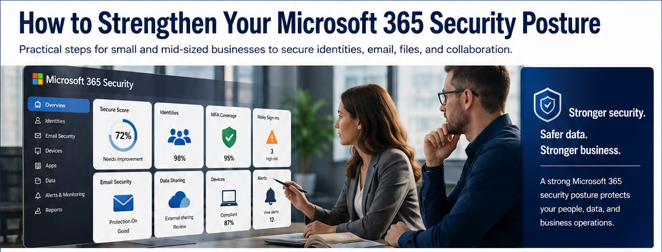
Microsoft 365 is one of the most important platforms inside many small and mid-sized businesses.
It supports email, file storage, meetings, collaboration, user access, and daily communication. Because so much business activity happens inside Microsoft 365, it has also become one of the most important areas to secure.
Many businesses assume that because Microsoft 365 is a Microsoft platform, security is already fully handled.
But Microsoft 365 security depends heavily on how the environment is configured, monitored, and managed.
The platform includes strong security capabilities, but those capabilities need to be reviewed and aligned with your business. Without the right controls in place, organizations may be exposed to phishing, account compromise, excessive access, risky file sharing, and gaps in visibility.
For business leaders, the question is not simply, “Do we have Microsoft 365?”
The better question is: Is our Microsoft 365 environment configured securely enough for how our business operates today?
Microsoft 365 Security for Small Business: Quick Overview
Microsoft 365 security posture refers to how well your Microsoft 365 environment is configured to protect users, data, email, files, collaboration tools, and business systems.
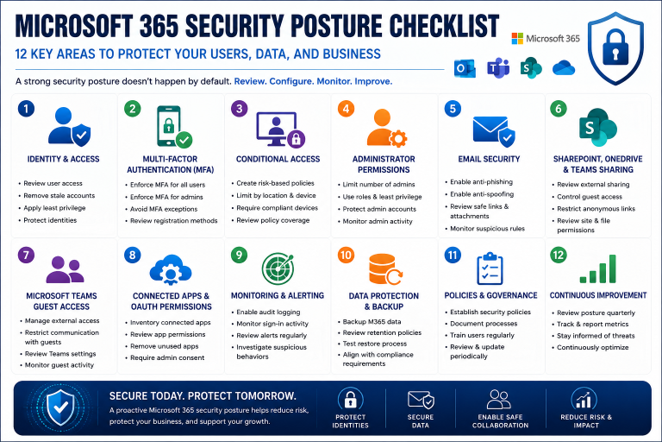
For small and mid-sized businesses, this includes reviewing:
- Multi-factor authentication
- Conditional Access policies
- Administrator permissions
- Email security settings
- Phishing and impersonation protection
- SharePoint and OneDrive sharing controls
- Microsoft Teams guest access
- Connected third-party apps
- User access and permissions
- Monitoring and alerting
- Backup and recovery considerations
- Security policies and ongoing reviews
A strong Microsoft 365 security posture does not happen automatically.
It requires the right combination of configuration, governance, monitoring, and user education.
Why Microsoft 365 Security Posture Matters
Microsoft 365 is where many businesses store and exchange sensitive information.
Email conversations, client files, employee records, financial documents, shared folders, Teams chats, and business communications often live inside the platform. If Microsoft 365 is not secured properly, attackers may have multiple paths to reach important business data.
Common risks include:
- Compromised user accounts
- Phishing emails reaching employees
- Unauthorized access to shared files
- External users retaining access too long
- Admin accounts with too much privilege
- Risky third-party app permissions
- Poor visibility into suspicious activity
- Sensitive data being shared outside the organization
These risks can affect more than IT.
They can impact operations, client trust, compliance, cyber insurance readiness, and business continuity.
A Microsoft 365 security review helps identify where your current configuration may not match your current risk.
Start with Identity and Access
In Microsoft 365, identity is one of the most important security layers.
An attacker does not always need to break into a server. In many cases, they only need to trick one user into giving up credentials or approving access.
Once a user account is compromised, attackers may be able to read email, send messages, access files, create forwarding rules, or attempt financial fraud.
That is why identity and access controls should be the foundation of Microsoft 365 security.
Business leaders should ask:
- Are all users protected by MFA?
- Are administrator accounts secured differently from standard users?
- Are risky sign-ins being monitored?
- Are users granted only the access they actually need?
- Are former employees and stale accounts removed promptly?
- Are access policies reviewed regularly?
Strong identity controls reduce the chance that one compromised password becomes a larger business incident.
Strengthen MFA and Conditional Access
Multi-factor authentication is one of the most important protections a business can enable.
But MFA should not be viewed as a one-time checkbox.
Businesses should confirm that MFA is enforced consistently across users, administrators, and remote access scenarios. They should also review whether exceptions exist and whether those exceptions still make sense.
Conditional Access adds another layer of protection.
It allows businesses to apply access rules based on conditions such as user role, device, location, risk level, and application being accessed.
For example, Conditional Access can help:
- Require stronger authentication for risky sign-ins
- Block access from unexpected locations
- Limit access from unmanaged devices
- Apply stricter controls to administrator accounts
- Reduce exposure from suspicious login behavior
This helps Microsoft 365 security become more adaptive.
Instead of treating every login the same, Conditional Access allows the business to respond differently based on risk.
Review Administrator Permissions
Administrator accounts are high-value targets.
If an attacker compromises an admin account, the potential impact can be much greater than a standard user account compromise. Admin access may allow changes to users, security settings, email rules, permissions, applications, or data access.
Businesses should regularly review who has administrator access and whether that access is still appropriate.
Important questions include:
- Who currently has admin rights?
- Does each admin truly need that level of access?
- Are admin accounts protected with stronger MFA?
- Are admin roles assigned based on least privilege?
- Are shared admin accounts being avoided?
- Are admin activities monitored?
The goal is to reduce unnecessary privilege.
Users should have the access they need to do their job — no more and no less.
Secure Email Against Phishing and Impersonation
Email remains one of the most common ways attackers target businesses.
Microsoft 365 email security should be reviewed regularly because phishing tactics continue to evolve. Attackers may use convincing language, vendor impersonation, executive impersonation, fake invoice requests, malicious links, or credential harvesting pages.
A stronger email security posture may include:
- Reviewing anti-phishing policies
- Reviewing anti-spam and anti-malware settings
- Protecting against spoofing and impersonation
- Reviewing safe links and attachment controls where applicable
- Monitoring suspicious forwarding rules
- Reviewing mailbox rules created by users
- Confirming SPF, DKIM, and DMARC alignment
- Training users to report suspicious messages
Email protection is especially important as AI-powered phishing becomes more polished and believable.
Technical controls and employee awareness should work together.
Review SharePoint, OneDrive, and Teams Sharing
Microsoft 365 is not only email.
Sensitive business data often lives in SharePoint, OneDrive, and Teams. These tools make collaboration easier, but they can also create data exposure risk when sharing settings are too open or permissions are not reviewed.
Businesses should evaluate:
- External sharing settings
- Guest access permissions
- Who can invite external users
- Which Teams allow external collaboration
- Whether shared links expire
- Whether anonymous links are allowed
- Who owns each SharePoint site
- Whether file permissions are still accurate
- Whether sensitive folders have unnecessary access
ICG’s approach can include scanning and visibility across SharePoint, OneDrive, and Teams to help identify risky activity, data exposure, and collaboration gaps.
The goal is not to stop collaboration.
The goal is to make collaboration secure, intentional, and manageable.
Review Connected Apps and OAuth Permissions
Many businesses do not realize how many third-party applications may be connected to their Microsoft 365 environment.
Users may grant apps access to email, calendars, files, contacts, or other Microsoft 365 data. Some apps are legitimate and useful. Others may be outdated, unnecessary, over-permissioned, or risky.
These connected apps can create hidden exposure.
A Microsoft 365 security review should include:
- Which apps are connected
- What permissions they have
- Which users authorized them
- Whether admin consent is required
- Whether unused apps should be removed
- Whether app permissions align with business needs
Connected app review is especially important because attackers may attempt to abuse application permissions as part of modern cloud attacks.
Visibility matters.
If you do not know what has access to your Microsoft 365 environment, you cannot properly manage the risk.
Improve Monitoring and Response
Security settings are important, but monitoring is just as important.
A business may have alerts available inside Microsoft 365, but if no one is reviewing them, the value is limited. Suspicious sign-ins, unusual forwarding rules, external sharing activity, failed login attempts, and risky user behavior should not go unnoticed.
Business leaders should understand:
- What alerts are being monitored
- Who reviews suspicious activity
- How quickly alerts are investigated
- What happens when an account is compromised
- Whether incidents are documented
- Whether response steps are tested
- Whether escalation contacts are clear
Strong monitoring helps businesses respond before a small issue becomes a major disruption.
Microsoft 365 security is not only about preventing attacks. It is also about detecting and responding quickly when something looks wrong.
Backup and Recovery Still Matter
Microsoft 365 security should also include backup and recovery planning.
Many businesses assume that because data is in Microsoft 365, it is automatically protected from every type of loss. But accidental deletion, malicious activity, retention gaps, user error, and account compromise can still create recovery challenges.
Business leaders should review:
- What Microsoft 365 data is backed up
- Whether email, OneDrive, SharePoint, and Teams data are protected
- How long backups are retained
- How quickly data can be restored
- Whether recovery has been tested
- Who is responsible for recovery
- Whether backup meets cyber insurance or compliance expectations
Backup is part of resilience.
If an incident happens, your ability to recover matters as much as your ability to prevent.
Related Resource
For a broader look at how cybersecurity risk affects small and mid-sized businesses, read our Cybersecurity for Small Businesses: The Complete Guide: https://www.icgi.com/blogs/cybersecurity-for-small-businesses-the-complete-guide
For more on how ICG helps businesses modernize and secure Microsoft cloud environments, visit our Microsoft Cloud services page: https://www.icgi.com/solutions/microsoft-cloud-services
What Business Leaders Should Review
Business leaders do not need to manage every technical Microsoft 365 setting, but they should know whether the environment has been reviewed properly.
Important questions include:
- Is MFA enforced for all users?
- Are Conditional Access policies configured?
- Are administrator accounts reviewed and protected?
- Are email security policies current?
- Are phishing and impersonation protections reviewed?
- Are SharePoint and OneDrive sharing settings controlled?
- Is Teams guest access managed properly?
- Are connected apps and OAuth permissions reviewed?
- Are suspicious sign-ins and risky activities monitored?
- Is Microsoft 365 data backed up appropriately?
- Do we know how we would respond to an account compromise?
- Has Microsoft 365 security been reviewed in the last 12 months?
These questions help shift the conversation from basic Microsoft 365 usage to a stronger security posture.
How ICG Helps Strengthen Microsoft 365 Security
ICG helps businesses review and strengthen Microsoft 365 security with a practical, business-focused approach.
Our team evaluates how your Microsoft 365 environment is configured today and identifies areas where security can be improved. This may include identity security, MFA, Conditional Access, admin permissions, email protection, external sharing, connected apps, SharePoint, OneDrive, Teams scanning, monitoring, and recovery readiness.
We focus on helping businesses reduce risk without creating unnecessary complexity for users.
The goal is to make Microsoft 365 more secure, more manageable, and better aligned with how your business operates.
The Bottom Line on Microsoft 365 Security Posture
Microsoft 365 includes powerful security capabilities, but they must be configured and managed correctly.
For small and mid-sized businesses, a strong security posture means more than turning on basic settings. It means reviewing identity, access, email, file sharing, collaboration, connected apps, monitoring, and recovery as part of a complete security strategy.
As cyberattacks become more convincing and business data becomes more cloud-based, Microsoft 365 security cannot be left on autopilot.
A structured review can help identify gaps, prioritize improvements, and reduce risk before a security issue becomes a business problem.
Ready to Strengthen Your Microsoft 365 Security Posture?
If your Microsoft 365 environment has not been reviewed recently, there may be security gaps hiding in plain sight.
ICG can help you evaluate your current configuration, identify risk areas, and prioritize practical improvements.
Schedule Your Cybersecurity Posture Review: https://bookings.cloud.microsoft/book/ComplimentaryAssessmentDiscussion@home.icgi.com/?ismsaljsauthenabled
No obligation. We’ll help you identify practical opportunities to reduce risk and improve Microsoft 365 security.
Related Questions Businesses Ask About Microsoft 365 Security
Is Microsoft 365 secure by default?
Microsoft 365 includes strong security capabilities, but default settings may not be enough for every business. Security depends on proper configuration, monitoring, access control, and ongoing management.
What is Microsoft 365 security posture?
Microsoft 365 security posture refers to how well your Microsoft 365 environment is configured to protect users, data, email, files, collaboration tools, and business systems.
Why should small businesses review Microsoft 365 security?
Small businesses should review Microsoft 365 security because email, user accounts, Teams, SharePoint, and OneDrive often contain sensitive business information. Misconfigurations can increase the risk of phishing, account compromise, and data exposure.
Frequently Asked Questions About Microsoft 365 Security for Small Business
What is Microsoft 365 security for small business?
Microsoft 365 security for small business includes the tools, settings, and policies used to protect email, user accounts, files, collaboration tools, and business data within Microsoft 365.
What Microsoft 365 security settings should businesses review?
Businesses should review MFA, Conditional Access, administrator permissions, email security, SharePoint and OneDrive sharing, Teams guest access, connected apps, monitoring, and backup.
Is MFA enough to secure Microsoft 365?
No. MFA is important, but it should be part of a broader strategy that includes Conditional Access, admin controls, email security, sharing governance, connected app review, monitoring, and backup.
What is Conditional Access in Microsoft 365?
Conditional Access allows businesses to apply access rules based on conditions such as user role, location, device, application, or risk level. It helps reduce unauthorized access and strengthen account protection.
Why are SharePoint, OneDrive, and Teams important to Microsoft 365 security?
SharePoint, OneDrive, and Teams often contain sensitive business files and collaboration data. If sharing settings, guest access, and permissions are not managed properly, the business may face data exposure risks.
How often should Microsoft 365 security be reviewed?
Most businesses should review Microsoft 365 security at least annually, or after major business changes, staff turnover, cyber insurance renewals, security incidents, or Microsoft licensing changes.
Can ICG help strengthen Microsoft 365 security?
Yes. ICG can help businesses evaluate Microsoft 365 security settings, identify gaps, prioritize improvements, and strengthen protections across identity, email, SharePoint, OneDrive, Teams, connected apps, and monitoring.
.png)